Voice Recording Gifts: Choose a Format and Make Your Message
Compare four voice-recording gift formats, use two original message examples, and follow a practical plan for recording, sharing and the first listen.

A voice recording gift starts with something you want the person to hear in your own voice. You can send an audio file, put a listening link inside a card, choose a recordable toy, or order a keepsake that connects to the recording. Choose the playback method first. Then make a short message that works in that format.
If they already enjoy voice notes, an ordinary recording with a thoughtful introduction can be the whole gift. If they want an object to keep, check how that object plays the sound before choosing it. A soundwave image and a playable recording are different things.
The provider features below were checked on 13 October 2026. Songbond is our own service; its optional original-song route appears after the voice-recording plan. We have not tested or ranked these providers' products.
Jump to: Choose a format · Two complete messages · Record and deliver it · Finish the accompanying note.
Four ways to give a voice recording
The best fit depends on how they will listen. The two DIY routes use your own recording; the purchased routes have their own ordering conditions.
| Format | Use it when | You prepare | Playback |
|---|---|---|---|
| An audio file and a note | They already open attachments or exchange saved voice recordings with you. | Your message, a clearly named audio file and a short introduction. | The exported audio file, opened through an app that supports it. |
| A card with a listening link | You want the message beside a photograph or handwritten note. | Your recording, a destination with suitable sharing access, and a readable link or QR code. | A device that can open the listening destination; check access and keep a separate copy. |
| A recordable toy | The person would enjoy an object that plays your message. | A recording that fits the selected product's capacity and ordering process. | The particular toy's control; check activation, recording replacement and storage instructions. |
| Playable art or a soundwave keepsake | They want a wearable or displayed object, and are comfortable with its listening method. | Your recording, the selected item and any required playback option. | The item's stated phone, NFC or app method. A soundwave picture alone is not an audio player. |
An audio file and a note
- Use it when
- They already open attachments or exchange saved voice recordings with you.
- You prepare
- Your message, a clearly named audio file and a short introduction.
- Playback
- The exported audio file, opened through an app that supports it.
A card with a listening link
- Use it when
- You want the message beside a photograph or handwritten note.
- You prepare
- Your recording, a destination with suitable sharing access, and a readable link or QR code.
- Playback
- A device that can open the listening destination; check access and keep a separate copy.
A recordable toy
- Use it when
- The person would enjoy an object that plays your message.
- You prepare
- A recording that fits the selected product's capacity and ordering process.
- Playback
- The particular toy's control; check activation, recording replacement and storage instructions.
Playable art or a soundwave keepsake
- Use it when
- They want a wearable or displayed object, and are comfortable with its listening method.
- You prepare
- Your recording, the selected item and any required playback option.
- Playback
- The item's stated phone, NFC or app method. A soundwave picture alone is not an audio player.
1. Send the audio file with a personal note
This is the simplest route for someone who is comfortable opening an attachment. Record the message, give the file a recognizable name, and send it through a channel you already use together. Include the occasion and who is speaking in the note, so it does not arrive as an unexplained file.
Keep a separate copy of the recording. If you use a chat app, check whether it sends a saved attachment or a temporary voice message; those are not always stored in the same way.
2. Put a listening link in a card
A link gives the recording a place beside a photograph or handwritten message. Choose somewhere to store it, set the sharing access for the person you are giving it to, and open the link as a recipient would before finishing the card.
You can write the link or turn it into a QR code. Include a readable link as well as the code, particularly if the card itself will arrive as an image on their phone. Our song QR-code guide explains that link-to-code method; the listening destination here should be your own recording. A QR code points to a destination. It does not keep the audio available if that destination disappears.
3. Choose a recordable toy
A toy can suit someone who wants an object with a familiar message inside it. Build-A-Bear's Record Your Voice information describes adding a recorded message while customizing a toy, recording through the ordering process and reviewing it before saving. Follow its current instructions and conditions for the particular order.
Before buying any recording toy, check its message capacity, how it is activated, and whether the recording can be replaced. Save your original file separately when the method lets you do so. Those details vary between products; a toy is not a substitute for your own audio archive.
4. Choose playable art or a soundwave keepsake
Soundwave Art describes keepsakes made from a recording, including necklaces that use NFC with a compatible phone and artwork with an optional app-based playback add-on. The object and the listening method matter together.
Check the exact item you are ordering: whether playback is included, which phone or app is needed, where the audio is hosted and what you can download. A picture of the soundwave alone does not tell the recipient how to hear it. If they prefer a gift that works without a phone, choose a different playback route.
Two complete original messages to start from
These people and memories are invented examples. Use the structure and replace the details with something that happened between you. You do not need a dramatic speech or a polished radio voice.
A birthday message from a friend
Happy birthday, Jo. I was thinking about the afternoon we tried to put my bookcase together. You read the instructions, I insisted we did not need them, and we ended up taking the whole thing apart. What I remember most is that you stayed. You made tea, found the missing screws and turned a frustrating day into one we still laugh about. Thank you for being the friend who shows up, even for the ordinary, slightly ridiculous things. I hope this year brings you more afternoons doing what you enjoy. When we next get together, I will bring the tea and read the instructions.
Why it works: the bookcase gives the thank-you a scene. The closing looks ahead without promising a specific trip or surprise. If Jo would dislike the joke, leave out the instructions and keep the appreciation.
An anniversary message from one partner to the other
Happy anniversary, Sam. I wanted you to hear this from me, even though I have said parts of it before. I love the way you leave the hall light on when I am coming home late. It is a small thing, but I notice it every time. I think about our first flat, the paper boxes we used as a table, and how we made a home out of very little. Our days look different now. I still look forward to getting back to you. Thank you for the life we keep making together. I love you, and I am glad we get to do another year.
Why it works: an ordinary action connects past and present. Keep those experiences only if they are true for your relationship. One accurate detail is better than borrowing a whole romantic history.
Make a general line sound like you
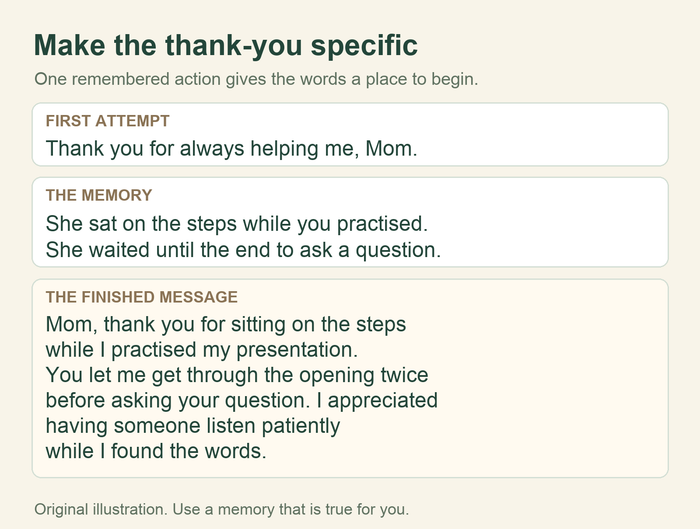
General: “You are always there for me.”
More specific, using an invented example: “When the last train was cancelled, you stayed on the phone while I worked out the bus route. I remember feeling less on my own.”
Start with an action you witnessed, say what it meant to you, and finish with the message you want to leave. Speak in the words you normally use together. A recording can include a pause or a laugh; it does not need to sound read by somebody else.
Record it and make the first listen easy
- Choose one message. Use one memory and one thank-you or wish. For a device with a length limit, check that limit before recording. For your own audio file, stop when the message is complete; there is no required duration.
- Use a quiet, familiar place. Place the phone steadily, keep it clear of clothing and paper, and record a short test at the distance you intend to use.
- Record and name the file. On an iPhone, Apple's Voice Memos instructions cover starting and stopping a recording and changing its name. On another phone, use its recorder's own help. Choose a filename such as “Birthday message from Casey” rather than leaving it as an unexplained number.
- Review your own take. Check that the first word is present, the name is clear, and the ending has not been cut off. Re-record if the words are hard to hear. The recipient does not need background music to understand the message.
- Export a listenable copy. Apple's sharing guide explains sending a Voice Memo through a sharing option. If you see a choice between Rendered and Editable, choose Rendered to share one audio file with the layers mixed together. Controls vary by software version. Keep the original as well as the copy you send.
- Check the delivery method. Open the exported file or shared link through the method the recipient will use. Check any sign-in request. If a QR card is part of the gift, check its link and keep a plain-link alternative.
- Give them a clear introduction. Send the note below or write your own. Let them choose a quiet moment to listen rather than expecting a recorded reaction.
A finished note for the card or message
I made you a little birthday message. It is me remembering an ordinary afternoon that still makes me smile. Open the audio when you have a quiet moment; there is no need to play it for everyone. Happy birthday, Jo. — Casey
If you send a link, add a separate line saying “Listen here:” followed by the actual listening address. If you attach the file, say “The recording is attached.” The note should explain the thing they have received and how to open it.
For a physical gift, show them the playback control or include the provider's instructions. Keep the first listen simple: the person should not have to guess whether the picture, code or button is the way in.
What if the recording will not open?
- The attachment cannot be played: check that you sent the exported audio file rather than an editable project. Try another sharing channel you already use together, and retain the original.
- The link asks for a sign-in: review the access settings and who the file has been shared with. Test again as a recipient. Do not put an unrestricted link into a public card if the message is meant to stay private.
- The QR code scans but gives an error: open the same destination as a plain link. Repair the destination or access settings before replacing the code.
- The gift needs an app or a compatible phone: use the exact item's instructions. Include a separate audio copy if the provider allows it, so the object is not the only way to hear the message.
A recording or an original song?
Choose your own recording when the sound of your speaking voice is the gift. Choose an original song when you want the names and memories arranged into lyrics and music. They complete different ideas; a written note can also be enough.
If a song fits what you want to give, start a personal Songbond song. You can share the recipient, music preferences and real memories in the song quiz. Use the current ordering options for the available formats.
Related reading: Digital gifts that feel personal · Questions for recording a family story.